
Add a WhatsApp Button to Your Site in 2 Minutes (Free HTML Generator!)


Link and Button Generator for WhatsApp. Works on WhatsApp Web and Mobile. HTML Code.


Check out my new projects: 1) automatically screen resumes with https://magicpeople.ai/ and 2) to track prices on your favorite site: https://price-tracker.io
How does it work?
It's just some simple CSS using media queries to show two different links: one that opens WhatsApp Web on bigger screens, and one that uses the WhatsApp API on phones.
Wordpress:
I'm going to make a plugin that adds this automatically very soon (I'd say in a week or two.)
For now, you can paste the code into your site's footer:
Appearance > Editor
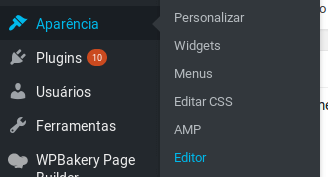
Go to the footer.php file and paste it at the very top.
Don't change anything else in the file. Don't delete or replace anything unless you know what you're doing.
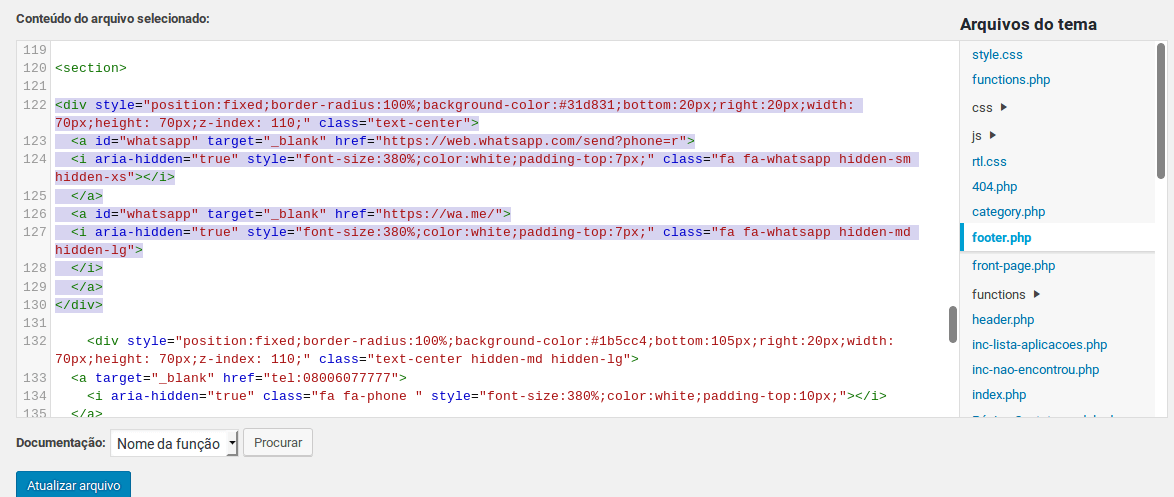
Don't forget to hit update on the file.